The Self-Hosted Platform for Real Business Applications
Build and run internal tools, admin panels, and customer-facing portals — on your own infrastructure, without vendor lock-in.
NovaBuilder is a system-first, open-source platform for modeling data, workflows, and user interfaces in one place. Replace scattered spreadsheets and ad-hoc scripts with a cohesive system that reliably serves both your teams and your customers.
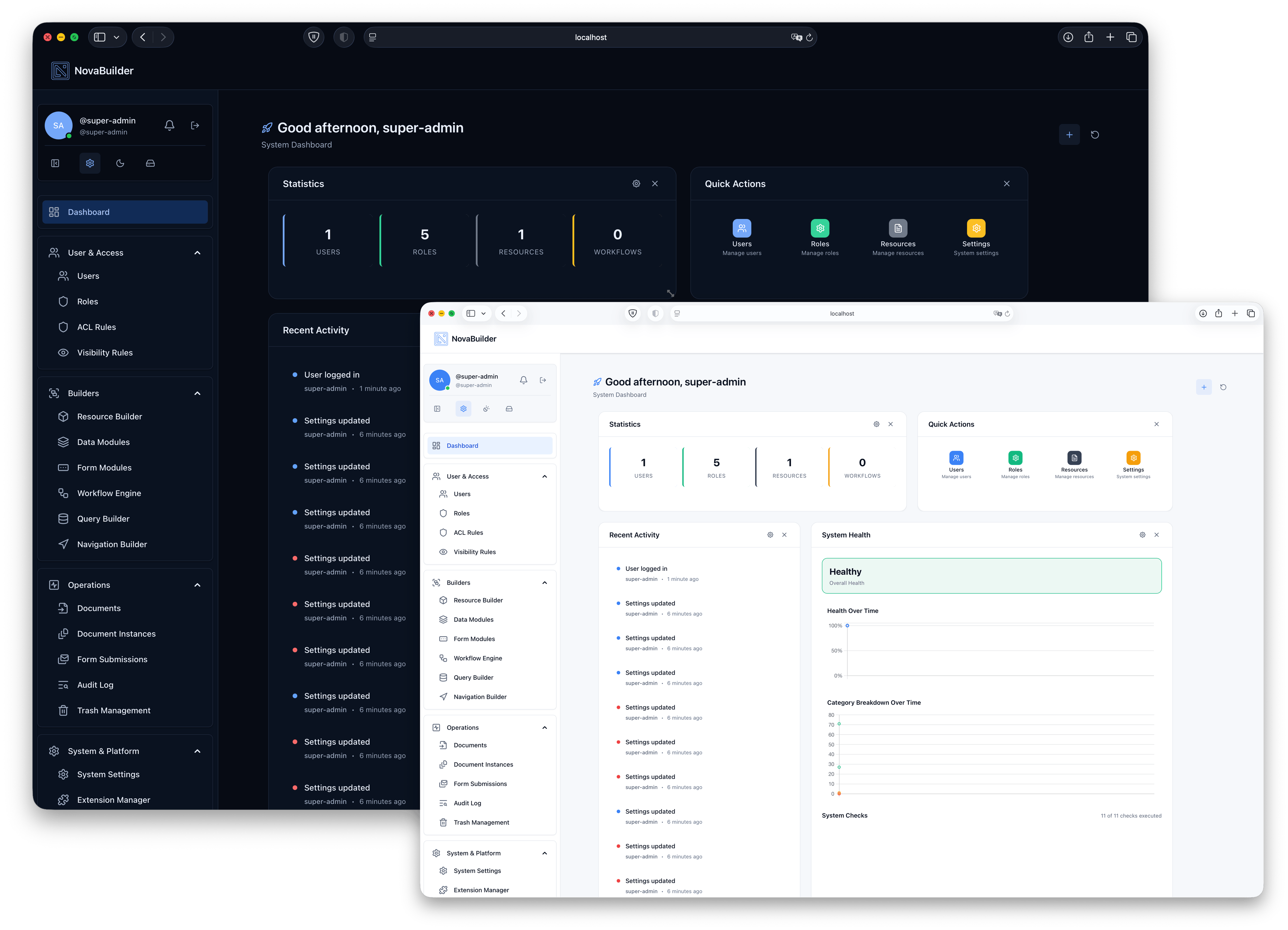
Key Features
From data models to workflows, admin panels, and public portals — the essentials in one self-hosted platform.
Generate Data Models from Excel or CSV
Upload a spreadsheet, infer fields and types, and turn it into DataModules that power internal tools, admin panels, and public portals.
Visual Workflow Engine for Business Logic
Design approvals, notifications, integrations, and automation in a visual canvas — for both internal processes and customer journeys.
Resource Page & UI Builder
Compose responsive pages from widgets and layouts to ship admin dashboards, backoffice panels, and customer-facing apps without hand-coding every screen.
Web Installer & Easy Updates
Install NovaBuilder from your browser, keep it updated with a built-in updater, and run the entire platform on your own servers.
The All-In-One Application Builder
One self-hosted platform for data models, workflows, and the UIs that power both internal tools and customer-facing apps.
Visual App Creation
Design applications visually with Resource Pages, Data Modules, Form Modules, and the Workflow Engine.
- Multi-tenant support
- API-ready
- Field validations and workflows
Security Built-In
RBAC, tenant isolation, audit trails. Designed for compliance-conscious deployments.
- Role-based access control (RBAC)
- Field-level permissions
- OWASP-aligned, secure-by-default
Queries & Data Exploration
Build and run queries on DataModules or custom SQL. Export results for reporting, dashboards, and external BI tools.
- DataModule-scoped and custom SQL
- Export results
- For widgets and reporting
From Scattered to Systematic
Spreadsheets, ad‑hoc extensions, loose logic — turn them into DataModules, extensions, and schemas.
- PDF, Excel, CSV export
- Extensions as ZIP
- Unified JSON schemas — LLM & AI-agent ready
UI for Business Systems
Vue & Inertia. Resource Pages, Forms, and admin UIs out of the box — built for operators, not designers.
- Responsive & accessible
- Admin & end-user optimized
- Vue & Inertia stack
Deploy in Minutes
Web installer and auto-updates. Shared-hosting compatible. Full control on your infrastructure.
- Web installer — no SSH or Composer to install
- Auto-update system
- Run on your own server
Who Is NovaBuilder For?
From startups to enterprises and governments, anyone building real business applications — internal and customer-facing — benefits from a system-first platform.
Startups
Launch SaaS products, customer portals, and internal tools without large dev teams. Iterate daily and keep full control of your stack.
SMBs
Digitize internal workflows and customer-facing processes. Reduce dev spend while staying independent from SaaS platforms.
Enterprises
Empower departments with secure builders for internal tools and external portals — under central governance and IT control.
Governments
Meet data residency and security requirements while delivering citizen portals, backoffice panels, and digital services.
Regulated Sectors
Security audits, compliance reports, field-level control — on a self-hosted, open-source platform you can fully inspect.
Developers
Build on a robust framework and focus on real business logic instead of rebuilding the same boilerplate for every project.
Why NovaBuilder instead of typical low-code or internal-tool builders?
System-First, Not Screen-First
NovaBuilder starts from data models, workflows, and governance — so the systems you build stay maintainable long after the first version ships.
Internal & Customer-Facing in One Stack
Use the same platform to power internal tools, admin panels, public portals, and customer dashboards — without juggling separate products.
Self-Hosted, Open-Source & AI-Ready
Run NovaBuilder on your own infrastructure, inspect the code, and expose unified JSON schemas that are ready for LLMs and AI agents.
Capabilities You Don’t Get in Typical Builders
Deep, system-first capabilities that go beyond typical low-code builders — all included in NovaBuilder CORE, built for long-lived business systems, compliance, and integrations. Extend and customize via extensions, hooks, and filters.
Unified Schemas & AI-Ready Data
DataModules, forms, workflows, and resource pages share consistent, machine-readable schemas that you can export and feed into LLMs and AI agents — so your automations and tooling always see the same structure as your app.
Access Control & Record Visibility
ACL rules, separate system/panel/public surfaces, and a Record Visibility Engine ensure that admins, internal users, and external users see exactly the records they should — and nothing else.
Native Payments with Stripe
Create checkout sessions, invoices, and orders from forms, and give customers a billing portal — all through NovaBuilder’s built-in Stripe integration, without custom payment plumbing.
Document Builder & Verification
Design versioned document templates, issue instances from workflows or on demand, and verify them via unique codes, optional PINs, and QR-powered public verification pages — ideal for certificates and compliance documents.
Connection Hub & Workflow Webhooks
Manage encrypted API credentials in a central Connection Hub and trigger workflows via generic webhook URLs — so any external system can safely call into NovaBuilder without secrets in code.
S3 Storage, Drives & Governance
Use S3-compatible storage for system data, form uploads, and user drives — with per-user quotas, file expiration, signed URLs, sharing and public links, plus audit logging and safety checks for compliance.
Audit, Governance & System Control
Record key CRUD operations, system tasks, and fixes in structured audit logs, enforce safe ACL changes to prevent lockouts, and keep queues, jobs, and storage healthy with built-in system control checks — so you always know who did what and whether the system is behaving.
Security — Actor Types, OTP, Passkeys
Model different identities as Actor Types linked to users and apply policies per user, role, or actor type. Enable optional OTP and modern passkeys (WebAuthn) from NovaBuilder’s settings so you can offer phishing-resistant biometric or device-based login without an external auth SaaS.
Extension Manager & Hooks/Filters
Install and manage extensions from the UI, enable or disable them safely, and let them contribute workflow nodes, translations, and more. A rich actions-and-filters API across resources, workflows, and views lets developers plug in custom behavior without forking the core.
Frequently Asked Questions
What is NovaBuilder?
NovaBuilder is a self-hosted, open-source platform for building real business applications — including internal tools, admin panels, and customer-facing portals. It is system-first: you define data models, workflows, and user interfaces in one place and run everything on your own infrastructure with full data control.
Is NovaBuilder self-hosted?
Yes. NovaBuilder is fully self-hosted. You run it on your own servers—from a single VPS to enterprise clusters—so you meet data residency and compliance requirements without relying on a third-party cloud.
How is NovaBuilder different from typical low-code or internal-tool builders?
Unlike typical low-code or internal-tool builders that focus mainly on UI components, NovaBuilder is system-first and self-hosted. It combines data models, workflows, resource pages, documents, storage, and payments in one stack, and separates system, panel, and public surfaces with granular access control.
Which capabilities are included in NovaBuilder CORE out of the box?
NovaBuilder CORE includes the deep capabilities described on this page out of the box: unified, machine-readable schemas for DataModules, forms, workflows, and resource pages; granular access control with a Record Visibility Engine; native Stripe integration for payments and billing; a document builder with versioning and verification; a Connection Hub and workflow webhooks for integrations; S3-compatible storage with user drives, quotas, and signed URLs; audit logging and system control checks; and security features such as Actor Types, optional OTP, and passkeys. On top of that, you can extend CORE with an Extension Manager and a hooks-and-filters system without relying on paid add-ons.
How does NovaBuilder handle documents and verification?
NovaBuilder lets you design versioned document templates and issue instances from workflows or on demand. Each document can be verified via a unique verification code, QR code, and optional 4-digit PIN on a public verification page, which helps meet requirements for certificates and compliance documents.
How does NovaBuilder integrate with Stripe for payments and billing?
NovaBuilder includes native Stripe integration for checkout sessions, invoices, and creating orders from forms. You can also give customers access to the Stripe billing portal, so payments and subscriptions are managed without custom payment code.
How does NovaBuilder manage data visibility and access control?
NovaBuilder uses RBAC, ACL rules, and a Record Visibility Engine. System, panel, and public surfaces are separated, and record-level visibility rules ensure that each actor only sees the records they are allowed to see, while admins retain safe overrides.
How does NovaBuilder handle storage, user drives, and quotas?
NovaBuilder uses S3-compatible storage profiles for system data, form uploads, and user drives. Per-user quotas, optional file expiration, signed URLs, and sharing and public links help you manage storage usage and secure file access.
How is NovaBuilder ready for AI and LLMs?
DataModules, forms, workflows, and resource pages share consistent, machine-readable schemas that you can export and feed into LLMs and AI agents. Combined with self-hosted deployment and an llms.txt file, NovaBuilder acts as a stable, AI-ready system-of-record.
How do I get started with NovaBuilder?
You can start by self-hosting NovaBuilder via the web installer (no SSH or Composer required) or by cloning the GitHub repository. Documentation and community support are available through GitHub Discussions.
How does NovaBuilder handle authentication, OTP, and passkeys?
NovaBuilder models identities as users with Actor Types and lets you enforce authentication policies per user, role, or actor type. In addition to classic password login, you can enable optional OTP-based two-factor authentication and modern passkeys (WebAuthn) directly in NovaBuilder’s security settings, so users can sign in with biometric or device-backed credentials without relying on an external auth SaaS.
How extensible is NovaBuilder? Does it support extensions, hooks, and filters?
NovaBuilder includes an Extension Manager in the UI where you can install extensions from ZIP files, enable or disable them safely, and let them contribute workflow nodes, translations, and other capabilities. Across the core, an actions-and-filters API lets extensions and custom code hook into resource controllers, workflows, and views without forking the core, so the platform behaves like a real ecosystem rather than a closed box.
Ready to Build Real Business Applications on Your Own Infrastructure?
Self-host NovaBuilder and ship long-lived business systems — from back-office tools and admin panels to public portals and customer dashboards.